FlowForge
A self-hosted visual automation platform for connecting applications, processing events and running reliable workflows. FlowForge turns a sequence of manual tasks into an executable graph. Receive a website enquiry, acknowledge the customer, route urgent requests to the right team, update a spreadsheet and inspect the result of every step—all from one workspace.
 React
 Laravel
 PostgreSQL
 Redis
FlowForge
A self-hosted visual automation platform for connecting applications, processing events and running reliable workflows.
FlowForge turns a sequence of manual tasks into an executable graph. Receive a website enquiry, acknowledge the customer, route urgent requests to the right team, update a spreadsheet and inspect the result of every step—all from one workspace.
Built with Laravel 12, PHP 8.3, React 18, TypeScript, PostgreSQL 16 and Redis 7, the project includes a visual workflow editor, a durable execution engine, provider integrations, tenant isolation, operational tooling and a Docker-based deployment path.

Contents
- Why FlowForge exists
- Real-world automation examples
- How a workflow works
- Features and functionality
- Technology stack
- Architecture
- Engineering challenges and solutions
- Quick start
- Build your first useful automation
- Connect a third-party website form
- Project structure
- Testing and quality gates
- Measured performance
- Security model
- Production deployment and operations
- Current scope and limitations
- Development and contribution
- Documentation
Why FlowForge exists
Business processes frequently span several applications. A form collects a lead, someone copies it into another system, sends an acknowledgement and forwards it to a colleague. Repeating that work costs time and makes it easy to miss a submission or lose track of a failure.
FlowForge provides a place to define those steps once and execute them whenever an event occurs.
| Problem | How FlowForge addresses it |
|---|---|
| Repeating the same actions across multiple apps | Connect triggers, transformations and integration nodes in a reusable workflow. |
| Delayed responses to enquiries or operational events | Start workflows from webhooks, public forms, schedules or provider events. |
| Different requests need different handling | Route items through conditions, switches, filters and branches. |
| An API is temporarily unavailable | Apply classified retries, backoff and Retry-After; inspect or replay exhausted work. |
| A process needs a human decision | Pause for an approval and resume through a single-use link without occupying a worker. |
| It is difficult to explain why an automation failed | Inspect the executed graph, step attempts, errors, timeline and paged input/output. |
| Multiple teams need separate access and credentials | Use workspace boundaries, role policies, credential sharing and scoped API keys. |
| Ad hoc scripts have no shared operating model | Run workflows through durable queues with health checks, recovery and execution history. |
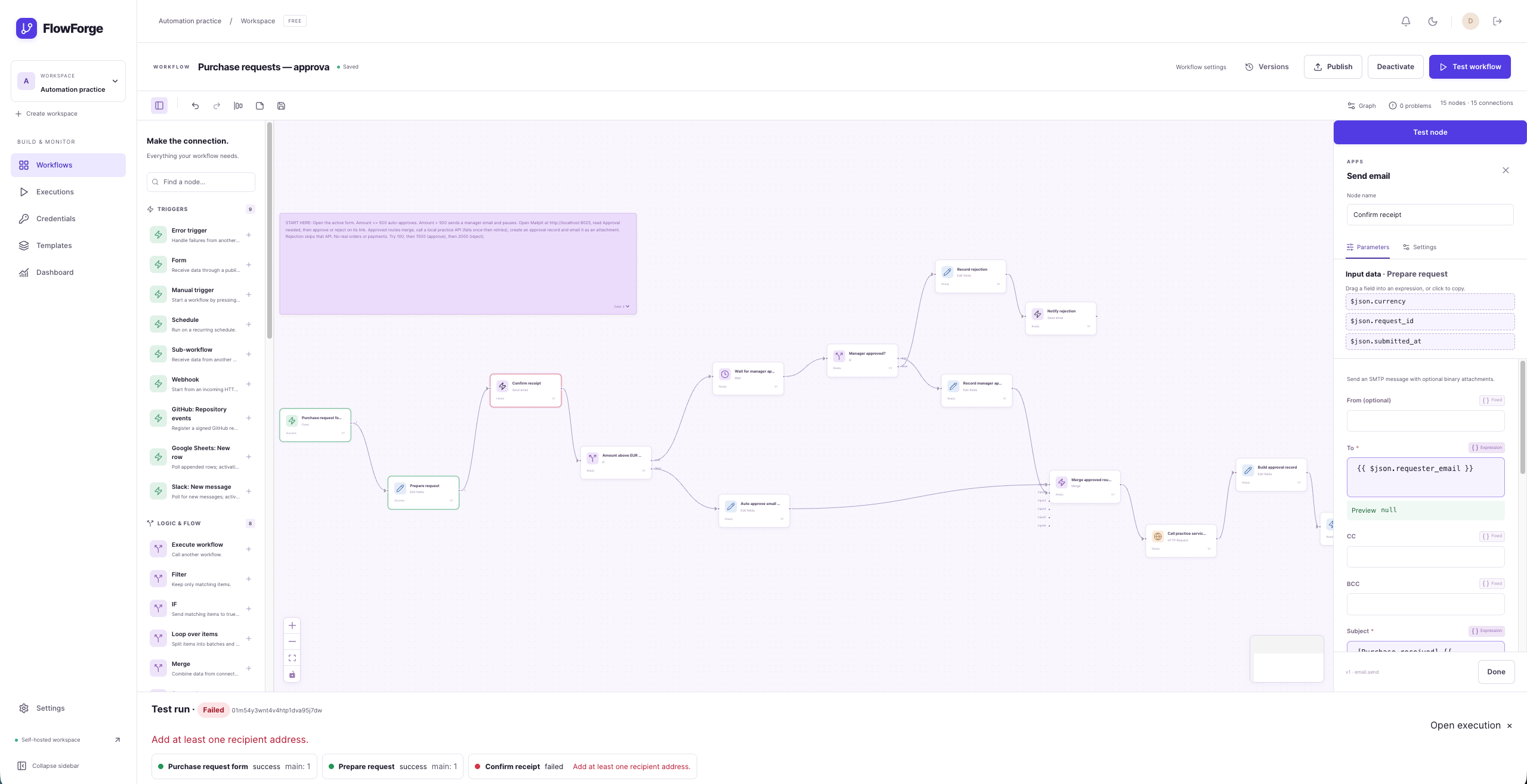
JSON appears in the inspector because it represents the information moving between nodes. The useful result is the action performed with that information: an email delivered, a row appended, a message posted or a request routed.
Real-world automation examples
| Use case | Example workflow | Practical benefit |
|---|---|---|
| Customer enquiries | Website webhook → acknowledge customer → check priority → notify team | Acknowledge every submission and flag urgent requests automatically. |
| Daily reporting | Schedule → HTTP API → transform data → email summary | Deliver a recurring report without manually collecting and forwarding data. |
| Expense approval | Form → approval request → wait → branch on decision → notify requester | Record a human decision while keeping the rest of the process automatic. |
| Contact imports | File-upload form → read CSV → map fields → append Google Sheets rows | Move submitted records into a shared spreadsheet. |
| Engineering notifications | Signed GitHub event → filter event → Slack message | Bring selected repository activity to the team. |
| Feedback classification | Incoming message → AI prompt with output schema → route category | Turn unstructured text into data that subsequent nodes can use. |
| Failure handling | Error trigger → extract failure context → email operator | Give failed automations a defined follow-up process. |
Provider-backed examples require the corresponding credentials and permissions. The local demo uses representative mock providers and real local SMTP delivery so it can be explored without cloud accounts.
How a workflow works
- Create a draft. Add nodes, connect their input/output ports and configure parameters and credentials.
- Test it. Run the draft and inspect live step statuses and output. Pinned data can help reproduce a test.
- Publish a version. Validation checks the graph and required credential access. Published snapshots remain immutable.
- Activate its trigger. Forms, webhooks, schedules and supported provider triggers can start runs automatically.
- Let workers execute the actions. Each run records its version, state, step attempts and retained data.
- Inspect or recover. Review successful work, diagnose a failure, cancel a run or use the applicable retry/replay controls.
Draft edits do not change the version already bound to an execution. Testing a draft and activating an automatic trigger are separate actions.
Features and functionality
Visual workflow editor
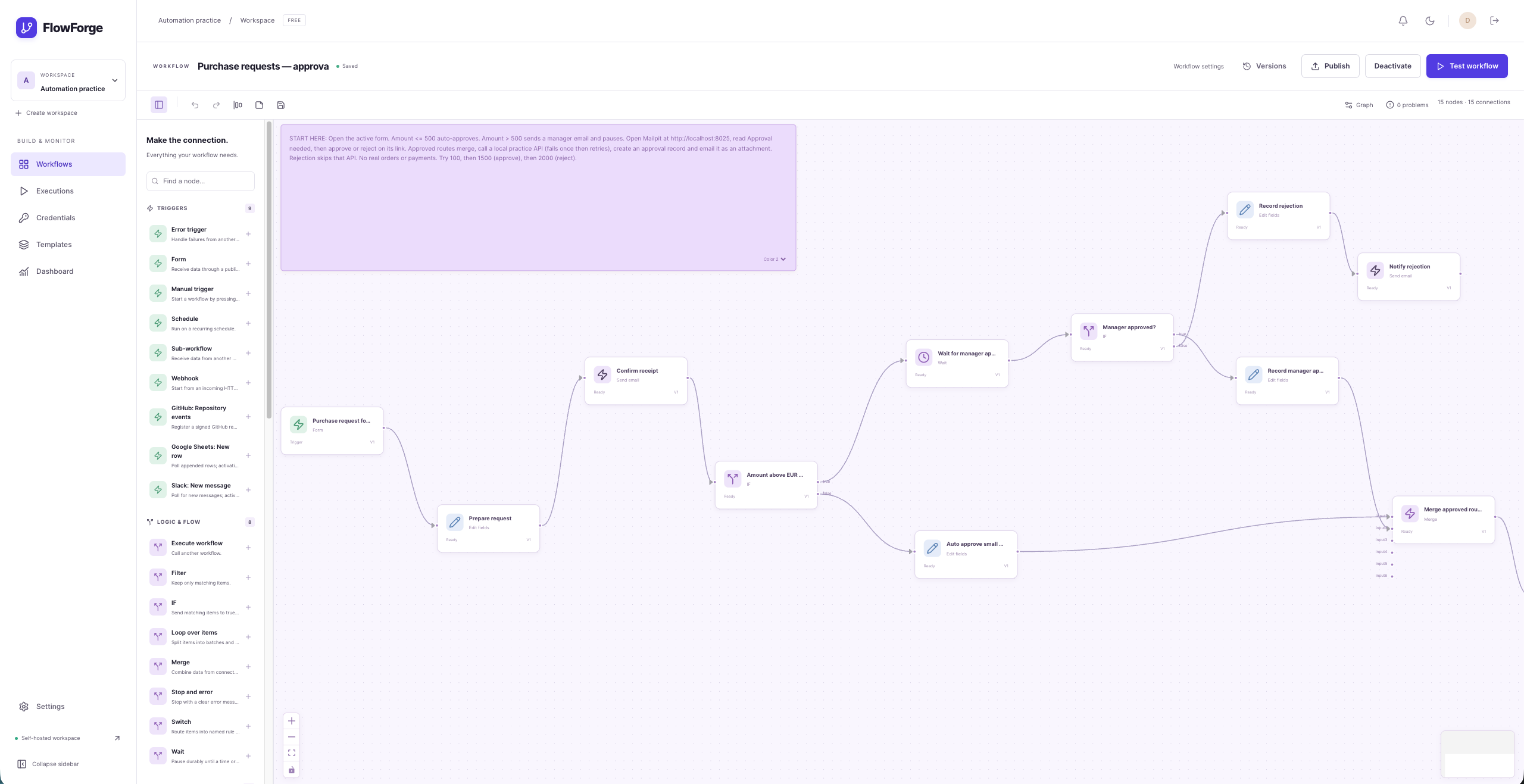
- React Flow canvas with searchable, grouped nodes and configurable connections.
- Schema-driven parameter forms, conditional fields and credential selectors.
- Undo/redo, copy/paste, keyboard shortcuts, automatic layout and sticky notes.
- Autosave, explicit save, validation diagnostics and optimistic draft conflict detection.
- Expressions with CodeMirror editing, autocomplete, previews and field insertion.
- Node reference rewriting when names change.
- Immutable published versions, restore/diff tools, import/export and duplication.
- Workflow folders, tags, search and cursor-paged lists.
Triggers and control flow
- Manual runs, webhooks, public forms, schedules, polling and supported app events.
- Webhook header/basic/HMAC authentication, idempotency and configurable responses.
- Test webhook listeners with received data available for editor testing.
- Cron/timezone configuration and upcoming-run previews.
- IF, Switch, Filter, Merge, loops, batching and data transformation nodes.
- Wait by time, webhook, form or approval; subworkflows with caller policies.
- Explicit error paths, error workflows and stop/error controls.
Durable execution and recovery
- Separate step and trigger/maintenance worker pools.
- Workflow/workspace concurrency limits and FIFO admission of queued work.
- Conditional claims and lock-version fencing for step results.
- Retries with backoff, jitter and
Retry-Afterhandling. - Heartbeats, checkpoints, timeouts and stale-worker recovery.
- Cancellation, failed-run retry, rerun, dead letters and replay.
- Waiting executions release workers and active concurrency capacity.
- Data retention that respects pinned data and shared payload/binary references.
Integrations and files
| Integration | Implemented capabilities |
|---|---|
| HTTP | API requests, authentication, bounded responses and streaming file handling. |
| Slack | Send messages, list channels and poll for new messages. |
| GitHub | Issue operations and signed repository webhook events. |
| Google Sheets | Read/append rows, map columns and poll for appended rows. |
| Email / SMTP | Send plain-text or HTML messages with optional binary attachments. |
| OpenAI / Anthropic | Prompt execution, explicit model selection, structured output validation and token usage. |
| PostgreSQL / MySQL | Parameter-bound query execution with database-enforced read-only mode by default. |
| Files | Uploads, multipart bodies, CSV/data conversion, extraction, attachments and signed previews. |
Credentials are configured separately from workflow graphs. OAuth connections use PKCE where supported, and authorized credential sharing lets team members use a connection without retrieving its stored secrets. See integration contracts and provider constraints.
Workspaces and security controls
- Owner, Admin, Editor and Viewer roles with backend authorization policies.
- Invitations, membership management, workspace switching and ownership transfer.
- Registration, session authentication, password reset and email verification.
- TOTP two-factor authentication, recovery codes and workspace enforcement.
- Credential encryption with a dedicated key and rotation support.
- Secret variables and show-once, scoped workspace API keys.
- Audit events, tenant-scoped resources and cross-workspace access tests.
Monitoring and user experience
- Live execution/step updates through authenticated WebSocket channels.
- Execution graph, timeline, attempts and paged input/output inspection.
- Dashboard statistics, duration percentiles, failure summaries and queue health.
- Notification inbox, queued email notifications, muting and failure digests.
- Six global templates, previews and missing-credential highlighting.
- Workspace template creation, editing and deletion.
- Light/dark interfaces, responsive screens, keyboard controls and automated accessibility checks.
- Loading, empty, error and success states, onboarding hints and error boundaries.

| Execution inspection | Template gallery |
|---|---|
 |  |
Technology stack
Versions below describe the project's selected stack; lockfiles record the resolved dependencies.
| Layer | Technology | Responsibility |
|---|---|---|
| Backend | PHP 8.3, Laravel 12 | API, policies, domain actions, workflow runtime and scheduled maintenance. |
| Authentication | Laravel Fortify and Sanctum | Account security, two-factor flows, session cookies and CSRF protection. |
| Database | PostgreSQL 16 | Durable workflow versions, execution state, tenant data and transactional coordination. |
| Queues and coordination | Redis 7, Laravel Horizon | Background jobs, coordination locks, cache and worker monitoring. |
| Real time | Laravel Reverb, Laravel Echo, Pusher protocol client | Authorized live status updates. |
| Object storage | S3-compatible storage, Flysystem, MinIO | Large payloads, binaries, previews and backup objects. |
| Frontend | React 18, TypeScript 5.9, Vite 6 | Typed single-page application and development/build tooling. |
| Graph editor | React Flow (@xyflow/react), Dagre | Interactive nodes/connections and automatic layout. |
| State management | TanStack Query, Zustand | Server data caching and local editor state respectively. |
| Forms and UI | React Hook Form, Zod, Radix UI, Lucide, Tailwind CSS/custom CSS | Validation, accessible primitives, icons and styling. |
| Expressions | Custom PHP/TypeScript interpreters, CodeMirror 6, RE2JS | Bounded expression evaluation, editor hints and previews. |
| Charts | Recharts | Dashboard visualizations. |
| Scheduling and validation | Cron Expression, JSON Schema / Opis | Schedule calculation and structured graph/output validation. |
| Development email | Mailpit | Capture and inspect local SMTP messages. |
| Observability | Horizon, Pulse, local-only Telescope, optional Sentry | Queues, slow operations, debugging and sanitized error reporting. |
| Production runtime | Docker Compose, nginx, PHP-FPM, Supervisor, Caddy | Static SPA/API serving, process supervision and HTTPS. |
| Backend quality | Pest, PHPUnit, Pint, Larastan level 8, PCOV | Tests, formatting, static analysis and coverage. |
| Frontend quality | Vitest, Testing Library, ESLint, Playwright, axe | Unit/UI tests, browser acceptance and accessibility checks. |
| Load testing and CI | k6, GitHub Actions | Arrival-rate benchmarks and automated quality gates. |
Architecture
The monorepo contains a Laravel backend and a React SPA. One backend codebase runs in separate processes for HTTP requests, node execution, trigger/maintenance work, scheduling and WebSockets.
PostgreSQL is the source of truth. Redis delivers jobs and supports coordination; a queue message alone does not define an execution's completed state. Small data stays in the database, while large payloads and binaries use private object storage.
HTTP handlers validate and schedule; workers perform actions. This keeps external API calls and other node work outside the request lifecycle. Scheduling successor jobs and publishing events follows transaction commits.
The node catalog is defined in PHP. Versioned node definitions describe ports, parameters and credentials. The frontend builds configuration forms from those definitions rather than maintaining a separate form for every node type.
Tenant and client state have explicit boundaries. Workspace context/scopes and policies protect server resources. TanStack Query owns server state; Zustand owns editor state. One typed API client handles envelope naming while preserving user JSON and other opaque dictionaries.
See the architecture document for execution sequences, storage boundaries and recovery details.
Engineering challenges and solutions
1. Recovering interrupted work without accepting stale results
A worker can die after claiming a step, and its original process may later resume after a replacement has started. Conditional claims increment a lock-version fence; subsequent writes must match that fence. Heartbeats and recovery jobs identify interrupted work, while real-process tests kill workers and verify recovery.
This protects local execution state. It does not create a universal exactly-once guarantee for remote side effects: a provider may accept a request immediately before the worker loses its connection or dies. Provider idempotency and durable per-item progress reduce duplication; the remaining crash windows are documented per integration.
2. Coordinating branches, merges and completion
Parallel branches can finish simultaneously, and some branches intentionally produce no output. Durable arrivals, dead-input resolution and loop lineage coordinate downstream work. Step completion and execution finalization share an execution-row lock so the finalizer cannot mark success while a successor is still being scheduled. Separate-process regressions exercise these races.
3. Accepting webhook bursts without serializing all execution work
Capacity decisions need coordination, but holding workspace/workflow locks during webhook persistence caused contention. Asynchronous webhook admission now persists queued work first; a trigger worker reserves FIFO capacity and schedules steps afterward. Compatible PostgreSQL lock modes allow foreign-key inserts to proceed, and coalesced refills avoid waiting only for a periodic sweep.
4. Keeping browser previews consistent with server execution
Expressions execute in both PHP and TypeScript. Independent bounded interpreters share 281 fixture cases covering the same grammar and behavior. Allowlisted functions and evaluation limits avoid arbitrary code execution. Paired-item lineage connects runtime references to the correct upstream data.
5. Protecting credentials across the entire workflow lifecycle
Encryption at rest alone is insufficient if a provider error or step output copies a secret into history. A separate credential key, authorization on use/share/publish, metadata-only resources and recursive masking address different parts of the lifecycle. OAuth refresh is locked and fenced against concurrent edits; two-process tests verify a single refresh request.
6. Inspecting large results without loading everything at once
Loading a graph, timeline and all item payloads together would make the viewer expensive. Metadata and item data are fetched separately, with bounded pages and reference-backed payload storage. The final full-suite browser measurement opened a 1,000-item result in 204 ms while rendering 100 rows.
7. Retaining useful data without unsafe bulk deletion
Payloads may still be referenced by pins, successful retry outputs or subworkflows. Reference-aware cleanup respects those relationships. A reversible migration repairs missing child-side foreign-key indexes; verification found zero uncovered references across 82 foreign keys. Monthly table partitioning was deferred because its composite-key and reference implications require a separate storage redesign.
8. Measuring reliability separately from throughput
A successful HTTP response proves acceptance, not completed automation. The load gate therefore checks both k6 arrival/error metrics and final database counts. Failed diagnostic runs are retained alongside the final accepted run. Instrumentation overhead was also measured: Horizon remains enabled, while optional duplicate Pulse queue aggregates and per-query backtraces are disabled by default.
The architecture decisions explain these tradeoffs, including release security, trigger lifecycle, retention and external side effects.
Quick start
Requirements
- Docker with the Compose plugin and a running Docker engine.
makeand a POSIX-compatible shell.- Available configured host ports and network access for initial dependency/image downloads.
- Optional host tooling: Node 20.19+ or 24 for frontend commands; Python 3 for the clean-setup verification script.
Start the local demo
From the repository root:
make setup
Setup installs locked dependencies, prepares storage, generates independent application/credential keys when absent, applies migrations, seeds examples and starts the services. Re-running it preserves existing keys and data.
Open http://localhost:5173 and select Log in as demo, or enter:
Email:    demo@flowforge.test
Password: password
The demo includes six example workflows, eight local credentials and 200 labeled illustrative historical executions. Those sample histories are not performance measurements. Seeded examples remain inactive until deliberately activated.
| Service | Default URL | Purpose |
|---|---|---|
| FlowForge | http://localhost:5173 | Build workflows and inspect executions. |
| API | http://localhost:8080 | Backend HTTP endpoints. |
| Horizon | http://localhost:8080/horizon | Authorized queue monitoring. |
| Mailpit | http://localhost:8025 | Read captured test emails. |
| MinIO console | http://localhost:9001 | Inspect local object storage. |
| Mock integration API | http://localhost:8090 | Representative local provider responses. |
Mailpit is a separate development tool; it is not an email-inbox screen inside the FlowForge dashboard. Local demo messages are captured there instead of being delivered externally.
If a port is occupied, copy .env.example to .env before setup and adjust the host-port settings. Setup prints the actual addresses. PostgreSQL and Redis remain on the Compose network. Application configuration lives in backend/.env; production has a separate configuration example under deploy/.
Useful commands:
make logs             # Follow application/worker/scheduler logs
make down             # Stop development services; keep their volumes
make setup            # Start again and apply setup steps
The bundled Daily digest is a quick end-to-end demonstration: test it in the editor, then open Mailpit to see its actual SMTP message.
Build your first useful automation
Create a contact-form workflow that acknowledges a customer and alerts your team.
- Create a workspace and choose Workflows → New workflow.
- Add a Form trigger with name, email, priority and message fields.
- Add Send email and select an SMTP credential. For local practice, configure host
mailpit, port1025, encryptionnoneand sendersupport@flowforge.test. - Use the submitted email for the recipient and the submitted name/message in the email content. Form values are available directly, for example
{{ $json.customer_email }}when the field name iscustomer_email. - Add an IF node that checks whether priority equals
urgent, then connect its true/false outputs to the corresponding team-email nodes. - Save, publish and activate. Open the form URL shown for the trigger and submit an enquiry.
- Open Mailpit to read the acknowledgement and team notification. Open Executions to inspect the chosen branch.
Each submission replaces manual acknowledgement, priority checking and forwarding. Change the priority and submit again to observe a different branch. Using your own verified SMTP connection enables actual email delivery; the local Mailpit connection is for practice.
Fresh installations include the six global templates. A practice workflow created in a running development database is local user data and is not automatically reproduced on a fresh clone.
Connect a third-party website form
Your existing website can keep its own form. Configure its server or form provider to POST submissions to a FlowForge Webhook trigger.
- Create Webhook → Send email, or add conditions and additional actions.
- Configure the webhook method/authentication, publish and activate the workflow.
- Copy the production webhook URL from the trigger configuration.
- In the website's form integration, configure that URL and the matching authentication. A custom website can send the request from its backend; some form products provide a webhook setting or plugin.
- Map the received fields into the email node and submit the website form.
For a simple JSON submission, an equivalent request is:
curl --request POST 'PASTE_YOUR_WEBHOOK_URL_HERE' \
  --header 'Content-Type: application/json' \
  --data '{"name":"Ali","email":"ali@example.com","message":"I need a website."}'
Add the authentication required by your configured trigger. Webhook JSON is available under the received body, for example {{ $json.body.email }}; FlowForge-hosted form fields are available directly on $json.
An external website needs a network-reachable FlowForge endpoint, normally a public HTTPS deployment. localhost points to the computer making the request and cannot serve as a public callback address. Webhook credentials/signing secrets should be handled by the website backend or form provider.
Project structure
flowforge/
├── backend/
│   ├── app/
│   │   ├── Actions/          # Application use cases
│   │   ├── Engine/           # Compilation, scheduling, runtime and repositories
│   │   ├── Expressions/      # PHP expression language
│   │   ├── Integrations/     # Provider implementations
│   │   ├── Nodes/            # Core nodes and node definitions
│   │   └── Triggers/         # Trigger lifecycle and input contracts
│   ├── database/             # Migrations, factories and seeders
│   ├── routes/               # HTTP/API and console routes
│   └── tests/                # Unit, feature, engine and service tests
├── frontend/
│   ├── src/api/              # Typed central API client
│   ├── src/features/         # Feature-owned components, state and tests
│   └── tests/                # Playwright browser scenarios
├── docker/                   # Development/production runtime configuration
├── deploy/                   # Production environment example and release state
├── docs/                     # Architecture, APIs, ADRs, screenshots and evidence
├── loadtest/                 # k6 workload and reproduction instructions
├── scripts/                  # Deploy, backup and fresh-setup verification
├── .github/workflows/        # CI configuration
├── docker-compose.yml        # Development stack
├── docker-compose.prod.yml   # Production stack
├── docker-compose.minio.yml  # Optional production MinIO override
├── Makefile
└── setup.sh
Testing and quality gates
The recorded local acceptance run includes:
| Verification | Result |
|---|---|
| Normal backend suite | 616 tests / 1,882 assertions passed. |
| Real network and locking checks | 9 tests / 37 assertions passed. |
| Separate-process concurrency checks | 5 tests / 72 assertions passed. |
| Frontend unit/component suite | 341 tests across 16 files passed. |
| Browser acceptance | 21 development scenarios plus 1 production HTTPS scenario passed. |
| Backend coverage | 87.9% overall; Engine 87.92%; Expressions 94.39%. |
| Static checks | Pint, Larastan level 8, frontend lint and strict type checks passed. |
| Builds and audits | Production build passed; Composer/npm audits reported zero vulnerabilities at verification time. |
| Accessibility | Automated WCAG A/AA checks passed across representative light/dark screens. |
| Operations | Local HTTPS, queue/storage readiness, backup/restore and graceful restart verified. |
These are recorded results, not a claim that every future environment or dependency update has already passed. See machine-readable verification and the phase acceptance ledger.
Run the main checks
make test
make check

docker compose exec -T app php -d pcov.enabled=1 vendor/bin/pest --coverage --min=70 --coverage-clover=coverage.xml
docker compose exec -T app php scripts/check-coverage.php coverage.xml
The coverage checker enforces 70% overall and 85% for Engine and Expressions.
For host frontend tooling:
npm --prefix frontend ci
npm --prefix frontend run lint
npm --prefix frontend run typecheck
npm --prefix frontend test
npm --prefix frontend run build
For browser acceptance, start the development stack, then:
cd frontend
npx playwright install chromium
npm run e2e
On macOS, an installed Chrome can be selected with PLAYWRIGHT_CHROME='/Applications/Google Chrome.app/Contents/MacOS/Google Chrome'. The separate production scenario requires PLAYWRIGHT_RELEASE_URL pointing at a configured HTTPS test deployment; see operations.
Run service and process acceptance
Run these sequentially after the normal backend suite because they share the test database:
docker compose --profile integration-tests up -d --wait mysql-test
docker compose exec -T -e FLOWFORGE_NETWORK_TESTS=1 app vendor/bin/pest tests/Unit/HttpNetworkTest.php tests/Unit/SqlNetworkTest.php tests/Unit/WorkspaceMutexNetworkTest.php
docker compose exec -T -e FLOWFORGE_CONCURRENCY_TESTS=1 app vendor/bin/pest --group=concurrency
These checks include real SQL bindings/read-only enforcement, simultaneous merges, worker termination and recovery, concurrent OAuth refresh and competing schedulers.
GitHub Actions configures backend/frontend gates, audits and conditional browser/service acceptance. E2E runs on main, manual dispatch, or pull requests labeled e2e; see the workflow for exact conditions. Remote CI results require pushing the repository and running those jobs; the evidence above comes from local verification.
Measured performance
The final load test offered 50 webhook requests per second for five minutes to a five-node graph. It ran over HTTPS on an isolated production Compose stack, sharing the local Docker VM with other projects.
| Measurement | Recorded result |
|---|---|
| Offered workload | 15,000 requests across 300 seconds. |
| HTTP acceptance | 15,000 accepted; zero HTTP failures or dropped iterations. |
| Completed work | 15,000 successful executions and 75,000 successful steps; zero failed/pending executions. |
| HTTP acceptance p95 | 36.74 seconds. |
| End-to-end p95, including queue delay | 775.34 seconds / 12.92 minutes. |
| Completed throughput across the full completion window | 13.16 executions/second. |
| Completion window | 1,139.43 seconds from first database acceptance to last completion. |
| Execution viewer | 1,000-item result opened in 204 ms with 100 rendered rows in the final full-suite run. |
| Clean setup and authenticated demo readiness | 69.22 seconds with fresh dependencies/volumes/keys and warm Docker layers. |
Acceptance rate and completed throughput are different measurements. This run proved no scheduled request or accepted execution was lost; it also exposed a substantial backlog and latency limit. It did not demonstrate 50 completed executions per second. Initial image downloads, dedicated production hardware and workflows with actual provider latency will produce different results.
The benchmark report includes failed diagnostics, raw results and exact environment/image/source fingerprints. Load-test instructions explain how to reproduce the workload and verify completion rather than stopping at HTTP 202 responses.
Security model
- Tenant isolation: workspace context, scoped models and role policies; inaccessible foreign resources return 404.
- Account security: session cookies/CSRF, authentication throttles, TOTP, recovery codes and workspace enrollment requirements.
- API access: separately hashed, show-once keys with scopes, expiry and current membership/role checks.
- Credential protection: dedicated authenticated encryption, rotation support, authorized sharing/use and redacted resource responses.
- Data minimization: known-secret masking across output/errors/logs; broadcasts carry status metadata rather than payload bodies.
- Outbound requests: DNS/IP/port and redirect checks, pinned resolution, timeouts and size limits to constrain SSRF and unbounded transfers.
- Expressions: a bounded allowlisted language rather than arbitrary PHP or JavaScript execution.
- SQL: fixed statements, native bound parameters, limits and database-enforced read-only mode by default.
- Files and public links: validated uploads, private storage, expiring previews and single-use hashed approval/resume tokens.
- Browser and operations: security headers/CSP, production HTTPS, operator-gated Horizon/Pulse and sanitized optional Sentry events.
Private-network access is explicitly enabled for the bundled local mock services. Production outbound policy and provider access should be configured for the installation. Automated regression tests and local acceptance provide engineering evidence; they do not substitute for an independent security review.
Production deployment and operations
Use the production operations guide and deploy/.env.example to configure the domain, HTTPS/ACME contact, database, storage, SMTP and runtime secrets.
The production stack includes:
- Multi-stage images with static frontend assets, nginx, PHP-FPM and opcache.
- Separate step and trigger/maintenance pools, scheduler and Reverb processes.
- Caddy HTTPS and private database/queue/storage networking.
- Deployment tooling for immutable image references, migrations, graceful worker restart, readiness checks and previous-image rollback.
- A 330-second worker shutdown grace period for in-flight steps.
/healthchecks for database, Redis, queue heartbeats and S3 put/read/delete.- Nightly custom-format PostgreSQL backups to S3 with 14-day retention and documented restore steps.
- Structured logs, Horizon and Pulse; Telescope only in local; optional sanitized Sentry reporting.
- Explicit production demo mode with a nightly reset of its dedicated marked workspace.
Back up the application key, credential key and private object storage separately from the database dump. Preserve existing keys during restarts and upgrades; use the documented rotation process for credentials. Application image rollback does not automatically reverse database migrations.
A local production HTTPS installation, real backup/restore and graceful restart have been verified. Public hosting, DNS, provider credentials and remote CI remain installation-specific configuration. Normal production seeding does not create the development default-password account unless demo mode is explicitly enabled.
Current scope and limitations
- External provider contracts use deterministic fake-response tests. Local SMTP, storage, SQL, queues and WebSockets also have real-service acceptance; live third-party accounts were not used for the recorded verification.
- Providers without idempotency support can repeat a remote side effect across a crash boundary; no universal exactly-once remote-delivery guarantee is claimed.
- The measured shared-machine load result has significant queue delay. Capacity planning must use completed throughput and actual workflow costs.
- The Google Sheets polling trigger tracks appended rows; it does not provide change-data capture for arbitrary row edits/deletions/reordering.
- Reference-aware retention is implemented; monthly physical table partitioning is deferred in ADR 0013.
- A Wait pauses serial successors. Distribute its resume link through the built-in approval email or an appropriately coordinated parallel branch; see ADR 0007.
- Public website callbacks require a reachable deployment. Localhost-only setup is intended for development and practice.
- Sandboxed arbitrary code nodes, AI graph generation, collaborative editing and Git workflow sync are optional future extensions, not current features.
Development and contribution
Start with the relevant architecture decision and the existing feature's tests. Keep changes consistent with these conventions:
- Thin backend controllers: request validation → application action → resource response.
- Business logic in actions/engine services, strict types, reversible migrations and ULID application identifiers.
- Tenant authorization and cross-workspace tests for resource operations.
- Idempotent jobs that re-check durable state before acting.
- Node definitions and versioned contracts that the frontend can render generically.
- Feature-owned React components/hooks/tests, server state in TanStack Query and editor state in Zustand.
- All frontend API calls through the typed client; user JSON must retain its keys and values.
- Tests for changed behavior, especially execution ordering, concurrency, recovery and authorization.
- Documentation/ADRs for new setup requirements and meaningful architectural tradeoffs.
Run the appropriate checks before submitting a change. Describe the problem, resulting behavior, validation and any migration/deployment requirements in the pull request. Avoid committing environment files, credentials, generated webhook capabilities, dependency directories or temporary test artifacts.
Documentation
| Document | What it covers |
|---|---|
| Architecture | Boundaries, execution lifecycle, storage and coordination. |
| API | Session, workspace, workflow, execution and public routes. |
| Public API OpenAPI | Machine-readable public v1 contract. |
| Integrations | Provider behavior, credentials and side-effect constraints. |
| Credentials | Encryption, sharing, OAuth and key rotation. |
| Operations | Deployment, health, backups, restore and rollback. |
| Benchmarks | Measured results, diagnostics and capacity limits. |
| Load test | Reproduction and zero-loss verification. |
| Architecture decisions | Engineering choices and documented deviations. |
| Two-minute demo script | A guided product walkthrough. |
| Build status | Phase acceptance and specification traceability. |
| Verification artifact | Exact recorded test and quality-gate totals. |
| Build specification | The complete project specification. |
A closer look.